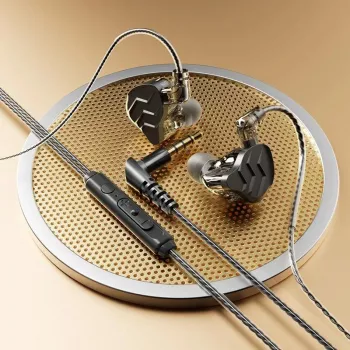
Wired gaming earbuds can deliver dependable low-latency sound and consistent voice chat without charging or wireless dropouts. This model supports both 3.5mm and Type‑C connections, includes a mic for team comms, and uses a detachable cable for quick replacements—aimed at mobile, handheld, and PC/console setups that favor simplicity and stability.
What Makes These Gaming Earbuds Different
Wireless audio is convenient, but competitive and co-op sessions often reward consistency. These wired gaming earbuds focus on the basics that matter most when timing and comms are non-negotiable:
- Dual-connection flexibility: Use a 3.5mm plug where it’s supported, or go with Type‑C for newer phones, tablets, and certain handheld gaming devices.
- Detachable cable design: If a cable gets snagged, frays, or starts cutting out, replacing just the cable is faster (and typically cheaper) than replacing the whole headset.
- Inline mic for clear coordination: Ideal for multiplayer callouts, voice notes, and everyday calls across common chat apps.
- Wired stability with low delay: No pairing steps, fewer connection surprises, and minimal audio latency—helpful for rhythm games, FPS footsteps, and reaction-based play.
For product details and current pricing, see 3.5mm/Type-C Wired Gaming Earbuds with Mic & Detachable Cable.
Compatibility and Everyday Use
The main decision is which plug your device supports best. While 3.5mm is straightforward, Type‑C audio can vary by device and operating system.
- Type‑C audio: Works best on devices that support USB‑C digital audio output. Some phones require specific settings, and some USB‑C ports may not output audio the way you expect.
- 3.5mm audio: Widely compatible with controllers, laptops, and desktops that still include a headset jack.
- PC/console chat: Some computers have separate headphone and microphone ports, which may require a splitter for full headset functionality.
- Mobile gaming: Wired Type‑C is a practical path when your phone dropped the headphone jack and you want to avoid Bluetooth delay.
Quick compatibility check
| Device |
Best plug to try first |
Notes |
| Phone/tablet with USB‑C (no headphone jack) |
Type‑C |
Requires USB‑C audio support on the device |
| Phone with 3.5mm jack |
3.5mm |
Simple plug-and-play for audio + mic if TRRS is supported |
| PC/laptop |
3.5mm |
May need a headset splitter if separate mic and headphone ports |
| Controller with 3.5mm jack |
3.5mm |
Common for console chat; confirm mic works in system settings |
| Handheld gaming device with USB‑C |
Type‑C |
Support varies by model and OS; test in audio settings |
If you want a deeper technical reference on how USB‑C is defined across devices, consult the USB Type‑C Cable and Connector Specification (USB-IF). For Apple devices and adapters, Apple Support can help confirm what your specific model supports.
Sound and Chat Performance Tips
Small tweaks can make wired earbuds sound noticeably better—especially in games where positional cues and voice comms are the difference between “nice try” and “next round.”
- Seal and fit matter: Try different ear tips. A good seal improves bass response and passive noise isolation; a poor seal can make audio feel thin and quiet.
- Reduce cable noise: If the inline mic or cable rubs against clothing, teammates may hear distracting thumps. Route the cable under a shirt collar or use a small clip if you have one.
- Fix echo fast: If teammates hear themselves, lower game volume a bit and enable echo/noise suppression in your chat app when available.
- Prioritize clarity for competitive play: Heavy bass boosts can mask footsteps and reload cues. A lighter bass EQ and clearer mids/highs can improve directional awareness.
Also consider safe listening habits during long sessions; the World Health Organization’s safe listening guidance is a solid baseline for protecting hearing over time.
Detachable Cable Advantages (and How to Make It Last)
Detachable cables are one of those features that only becomes “must-have” after the first time a cable fails mid-match. With proper handling, you can extend the life of both the cable and the earbuds themselves.
- Fast fixes: If you get intermittent audio, crackling, or one-sided sound, swapping the cable can solve the most common wear-and-tear issues.
- Protect the ports: When unplugging, grip the connector housing—not the wire—to reduce strain on both ends.
- Store smarter: Loosely coil the cable instead of bending it sharply. A small pouch prevents snags in backpacks, desk drawers, or pockets.
- Keep connectors clean: Lint and debris (especially in Type‑C ports) can cause dropouts or poor contact. Keep ports dry and clear before connecting.
Setup Checklist for the Best Experience
A Budget-Friendly Option for Wired Play
More in-stock picks
FAQ
Will the Type‑C plug work on any USB‑C phone?
Not always. The phone must support USB‑C digital audio output, and some models or settings can limit wired audio behavior. If it doesn’t work immediately, check the manufacturer’s support notes and test USB audio settings on the device.
Does the microphone work on PC and console controllers?
It depends on the port type and how the device handles headset inputs. Console controllers with a combined TRRS jack commonly support headset mics, while many PCs with separate headphone and mic ports may require a splitter to use the mic.
How can audio delay be minimized for mobile gaming?
Use the wired connection instead of Bluetooth, and confirm your phone is routing audio through the cable rather than a wireless device. Closing background apps and keeping the OS audio route clean can also help reduce hiccups.
Recommended for you

Leave a comment